Today, we’ll explore MCP (Model Context Protocol), a concept that’s gained serious traction in the agentic space over the past six months. This post will walk you through what MCP is, when to use it, and key security pitfalls to watch out for.
What is MCP?
LLM-based applications are growing increasingly sophisticated and complex. That’s largely because most top-tier LLMs now support larger contexts, allowing engineers to feed more data into prompts. This unlocks the ability to build agentic applications that go far beyond basic LLM wrappers: they can make decisions, interact with tools or other agents, and act on behalf of users.
As these apps evolved, a clear need emerged: we needed a protocol to standardize how they interact with external resources. That’s where MCP comes in. It’s designed to be lightweight, straightforward, and easy to implement. MCP follows a client-server architecture: the app is the client, and the server exposes tools, resources, prompts, and more in a consistent format. Then, the LLM can decide which resource to use at runtime to complete its task.
This setup allows developers to spin up new MCP servers and share them with the community or connect to existing ones. There’s no language dependency, servers and clients can be written in whatever language you prefer, as long as they adhere to the protocol’s standards.
In this post, we’ll focus primarily on the architecture of the protocol and what you should know before implementing your first MCP-compliant agent. For deeper technical details, check out the official docs.
Architecture
MCP defines the endpoints a server must expose, the expected request/response message formats, and how data is transmitted between client and server. It’s based on JSON-RPC, and the protocol was intentionally kept minimal to encourage rapid adoption. We’re not diving deep into the specifics of endpoints and messages here, but a few core examples are: tools/list, resources/list, and tools/call. They’re straightforward and easy to reason about.
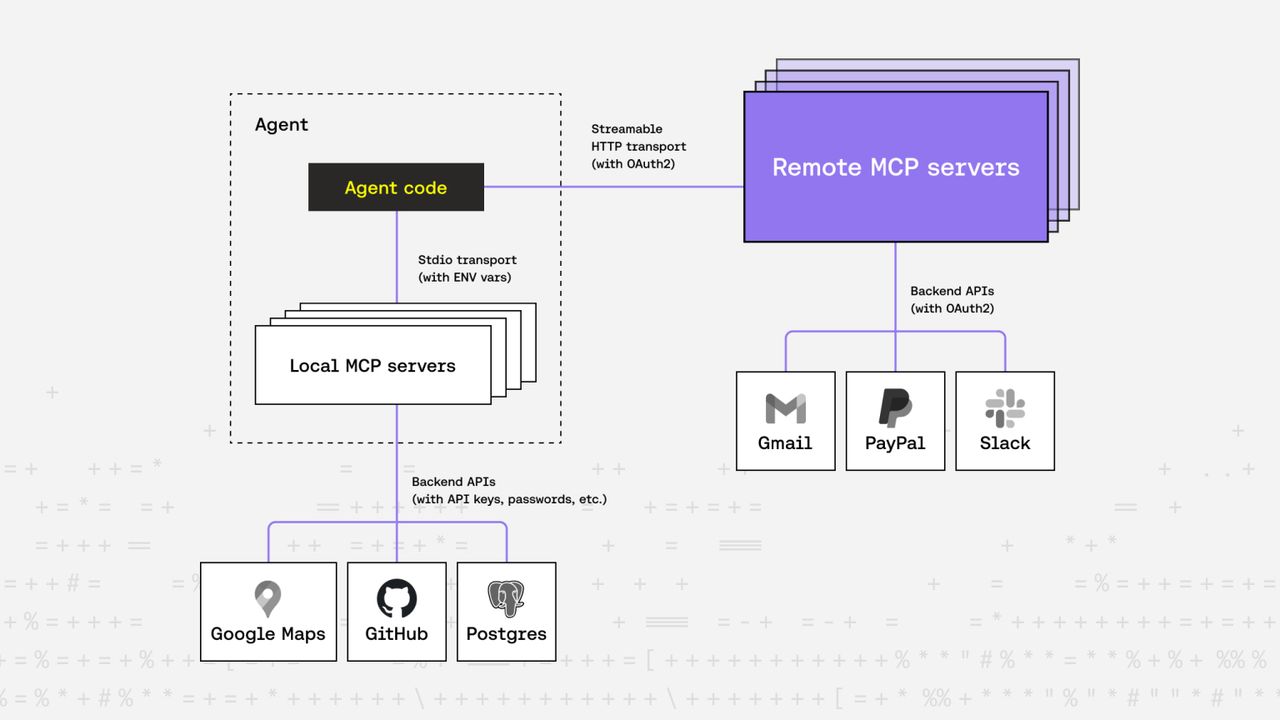
At the heart of MCP’s architecture is one of its most important components: transports. These define how messages are transmitted between client and server. Out of the box, MCP supports two transport types: stdio and Streamable HTTP, but you’re free to implement others, just make sure both client and server support them.
stdio
This is the most widely supported transport among open-source MCP servers today. Here, the client spawns the server as a subprocess and communicates via standard input/output streams. No HTTP, no complex auth, just simple, effective messaging. API keys or other credentials are passed in as environment variables.
Streamable HTTP
This one adds a layer of complexity. Imagine the server and client aren’t on the same machine, and the server needs to support multiple concurrent clients. Now you have to consider authentication methods, API key handling, and whether to support human-in-the-loop flows for login.
The first version of MCP didn’t address this. But as demand grew, the community asked for a standardized way to handle remote server authentication.
The maintainers responded quickly, introducing authentication standards in the next release. MCP servers using Streamable HTTP are now expected to be fully OAuth2 compliant. This was a smart choice, OAuth2 is mature, well-understood, and widely adopted.
So now, MCP clients just need to implement the standard OAuth2 flow to talk to remote servers:
- Register the client to get a Client ID from the authorization server.
- Redirect the user to log in.
- User authorizes the client.
- Client receives access tokens and can start making authenticated calls.
We’re glossing over a lot of OAuth2 details here, but the key point is this: by using OAuth2, authentication is offloaded to an existing, widely used standard.
But there’s a catch.
This only works if the access token granted to the MCP client is also accepted by the backend APIs that the MCP server will call. If not, the client can talk to the server, but the server can’t reach the required backends. For this setup to work, the authorization server used by the MCP server must also be accepted by those backend services.
Let’s walk through a real-world example.
Imagine Google wants to expose a Gmail MCP server. They’d need to support OAuth2, no problem, Gmail already does. They could deploy the MCP server to use Gmail’s existing authorization server. So when a client interacts with the Gmail MCP server:
- The user is redirected to Gmail’s login page.
- They log in and authorize the client.
- The client receives OAuth2 tokens.
- The client can now use the Gmail MCP server to send emails, read inboxes, etc., because the Gmail backend will also accept the access tokens issued by the auth server.
Again, this only works because the MCP server and Gmail’s backend share the same auth infrastructure.
Clients
Now that we’ve covered servers, let’s talk about MCP clients.
As mentioned earlier, MCP is primarily useful for agentic applications. There’s no hard definition of what counts as “agentic,” so we’ll use this one: if your app uses LLMs with tool-calling capabilities to solve complex tasks on demand, it’s agentic.
These are the apps that benefit from MCP. They act as clients, connecting to servers that expose the necessary tools and resources.
MCP client SDKs are already available in multiple languages and are easy to integrate. Just wire MCP server calls into your app using the SDKs, pass the available tools and resources to your LLM, and let it decide which one to call. That’s it. There’s already a growing list of community-maintained servers at mcpservers.org, so integrating MCP into your app opens up a lot of possibilities.
If you want to experiment with MCP without writing your own agentic app, you can use Claude Desktop, VS Code with Copilot, or any of the following apps that support MCP. Just configure a few servers in a config file, and you’re good to go.
Here’s an example mcp.json config you can drop into your .vscode folder. It defines both local and remote MCP servers your agent can connect to:
{
    "servers": {
        // Local servers
        // https://github.com/modelcontextprotocol/servers/tree/main/src/git
        "git": {
            "command": "uvx",
            "args": ["mcp-server-git", "--repository", "path/to/git/repo"]
        },

        // https://github.com/modelcontextprotocol/servers/tree/main/src/fetch
        "fetch": {
            "command": "uvx",
            "args": ["mcp-server-fetch"]
        },

        // Remote servers
        "neon": {
            // source: https://neon.tech/docs/ai/neon-mcp-server
            "command": "npx",
            "args": [
                "-y",
                "mcp-remote",
                "https://mcp.neon.tech/sse"
            ]
        },
        "paypal": {
            // source: https://developer.paypal.com/tools/mcp-server/
            "command": "npx",
            "args": [
                "-y",
                "mcp-remote",
                "https://mcp.paypal.com/sse"
            ]
        }
    }
}
Since Copilot doesn’t natively support remote servers via Streamable HTTP, we use mcp-remote, a lightweight proxy that bridges stdio-based clients with remote servers. It handles OAuth2 flows, manages client credentials and tokens, and translates communication across transport layers.
Also worth noting: many remote MCP servers still use SSE (Server-Sent Events) rather than the newer Streamable HTTP format. That’s because the initial MCP auth spec used SSE; Streamable HTTP was introduced later as a more general replacement, and adoption is still catching up.
Security Considerations
As MCP adoption grows, it’s important to think critically about the security risks of integrating third-party servers, especially in production environments.
Code Security
Keep in mind, many MCP servers require to pass in API keys or handle OAuth tokens and other secrets at runtime. This means you are trusting the server with priviliged access.
This trust shouldn’t be default, because:
- This technology is still very new, a lot of the open source servers are not mature enough for production use.
- Many of them are just side projects without security hardening.
- There are already hundrends of servers out there, with more appearing daily.
Treat them as untrusted by default and make sure you do your research before integrating them into your app.
Prompt Injection
Since LLMs are responsible for choosing which tool to call, they are prone to prompt injection attacks from two sides:
- A malicious user prompt could manipulate the model into invoking a tool it shouldn’t.
- A malicious tool response could bias the LLM’s future actions.
These risks could be mitigated using proper validation middlewares on both sides and by using trusted MCP servers only.
Client-Server Trust Boundaries
Whether you’re using local or remote MCP servers, establishing trust between the agent and the server is critical:
- In a local setup, you need to ensure that only trusted processes are spawned. This prevents rogue processes from impersonating MCP servers.
- With remote servers, you need clear controls over which servers the agent can connect to.
In both cases, trust boundaries should be configurable without hardcoding them into the application. This is where non-human identities (NHIs) become essential. Riptides’s kernel-level, SPIFFE-based identity system offers a strong zero-trust foundation for agent/server authentication and policy enforcement. We cover this in more depth in our previous post.
Conclusion
MCP is rapidly becoming the backbone of how LLM-based agents interact with structured, external tools. If you’re building apps where LLMs do more than just chat, apps that act, fetch, call, and decide, MCP is worth integrating now. As you adopt this protocol, don’t overlook the security implications of agentic autonomy. Riptides provides a zero-trust foundation for machine and non-human identity, and policy enforcement, ensuring that your agents only talk to what they’re supposed to, and nothing else. Stay tuned for deeper dives into how we’re securing this fast-moving landscape.
If you enjoyed this post, follow us on LinkedIn and X for more updates. If you'd like to see Riptides in action, get in touch with us for a demo.