Why Cloud-Native Federation Isn’t Enough for Non-Human Identities in AWS, GCP, and Azure
1. Quick recap: What we have today
Before we delve into the core issues, let’s briefly review the landscape of non-human identity (NHI) federation among the big three cloud providers. We’ve previously covered how external identity federation using ID tokens works in AWS, GCP, and Azure in this blog post.
In short
- AWS, GCP, and Azure support external identity providers (IDPs) via OpenID Connect (OIDC).
- Workloads running outside the cloud (e.g., on-prem or in another cloud) can authenticate to cloud APIs using short-lived ID tokens from an external IDP.
- These ID tokens must be securely retrieved and rotated, usually by software running alongside the workload. Major cloud providers offer built-in mechanisms for this when workloads run natively on their infrastructure via instance metadata services.
Cloud-specific examples
AWS
EC2 instances can use instance profiles to obtain temporary credentials with the permissions of an IAM role. These credentials are fetched via the AWS Instance Metadata Service (IMDS) and can be used by workloads running on the instance to request a signed token from AWS STS.
This token can then be exchanged:
- With GCP’s Workload Identity Federation endpoint for a GCP access token.
- With Azure Entra’s Workload Identity Federation endpoint for an Azure access token.
This allows workloads running on AWS EC2 instances to authenticate to GCP or Azure using the IAM role of the instance.
Microsoft Azure
Azure VMs can be assigned managed identities. Workloads on such VMs can retrieve access tokens directly from the Azure Instance Metadata Service without requiring secrets. The VM’s managed identity backs these tokens and is automatically scoped to the environment.
This token can then be exchanged:
- With GCP’s Workload Identity Federation endpoint for a GCP access token.
- With AWS STS for AWS temporary session credentials.
This allows workloads on Azure VMs to authenticate to GCP or AWS using the managed identity of the VM.
Google Cloud Platform (GCP)
GCP VMs can obtain identity tokens from the GCP Instance Metadata Service (IMDS). These tokens represent the VM’s service account and can be retrieved by any workload running on the VM without requiring secrets.
This token can then be exchanged:
- With Azure Entra’s Workload Identity Federation endpoint for an Azure access token.
- With AWS STS for AWS temporary session credentials.
This allows workloads running on GCP VM instances to authenticate to Azure or AWS using the VM’s identity.
Limitations
While these integrations enable multi-cloud identity federation, they have important limitations:
- Shared identity per instance: All workloads on a VM share the same identity, which limits isolation and accountability.
- No fine-grained workload identity: There’s no built-in way to distinguish which process or container made a request.
- Credentials not scoped to workload: If one workload is compromised, it can use the shared identity to impersonate others on the same host.
2. The hidden credential management burden
Even with cloud federation mechanisms in place, something still has to retrieve the ID token in the first place. This often means:
- Storing client secrets or service account keys securely.
- Managing lifecycle and refresh logic of tokens.
- Protecting tokens at rest and in memory.
When workloads run within a cloud provider’s infrastructure, this burden is significantly reduced thanks to built-in identity mechanisms:
- AWS Instance Metadata Service (IMDS) provides IAM role credentials to EC2 instances.
- Azure Managed Identities allow token acquisition without storing secrets.
- GCP Instance Metadata Service exposes identity tokens tied to VM service accounts.
However, as discussed above, these cloud-native options come with important caveats, particularly regarding shared identity at the instance level. As a result, they may not be desirable in scenarios requiring strict workload-level isolation.
For hybrid environments, on-prem infrastructure, or more fine-grained identity boundaries, you’re still often left with the traditional complexity of securely provisioning and rotating credentials to the right process and keeping them out of reach from others.
Solutions like HashiCorp Vault, or AWS Secrets Manager help, but they introduce their overhead as they require setup, access control, encryption configuration, and often come with latency and availability concerns.
In the end, secure credential distribution and isolation remain a hard problem, even when federation mechanisms are available.
3. What ideal federation should look like
Imagine a world where you don’t have to think about storing or rotating secrets, where every workload has its own cryptographic identity, and where credential issuance is automatic and secure.
This vision includes:
- Identity-first architecture: Workload identity is the foundation. Everything from access decisions to credential issuance is built on this verifiable identity.
- No stored secrets: Workloads receive ephemeral credentials only when needed.
- Short-lived credentials: Always fresh, scoped, and revocable.
- Automatic rotation: Credentials are seamlessly renewed without developer intervention.
- Secure delivery: Credentials are scoped so only the intended workload can access them.
- Verifiable workload identity: Identities are assigned securely based on workload attributes such as binary path, command-line arguments, workload name, namespace, or deployment metadata. A workload cannot assume any identity other than the one intended for it.
This enables:
- Fine-grained, per-workload identity even on the same node.
- Simpler, declarative policy management.
- Stronger security guarantees that are harder to bypass or misconfigure.
This is exactly what we’re building at Riptides: rooted in the Linux kernel and built on SPIFFE, that works seamlessly across on-prem, hybrid, and cloud-native environments.
4. How Riptides solves this
Riptides acts as an external identity provider (IDP) to cloud platforms like AWS, GCP, and Azure, solving the credential delivery challenge at the operating system level.
Here’s how it works:
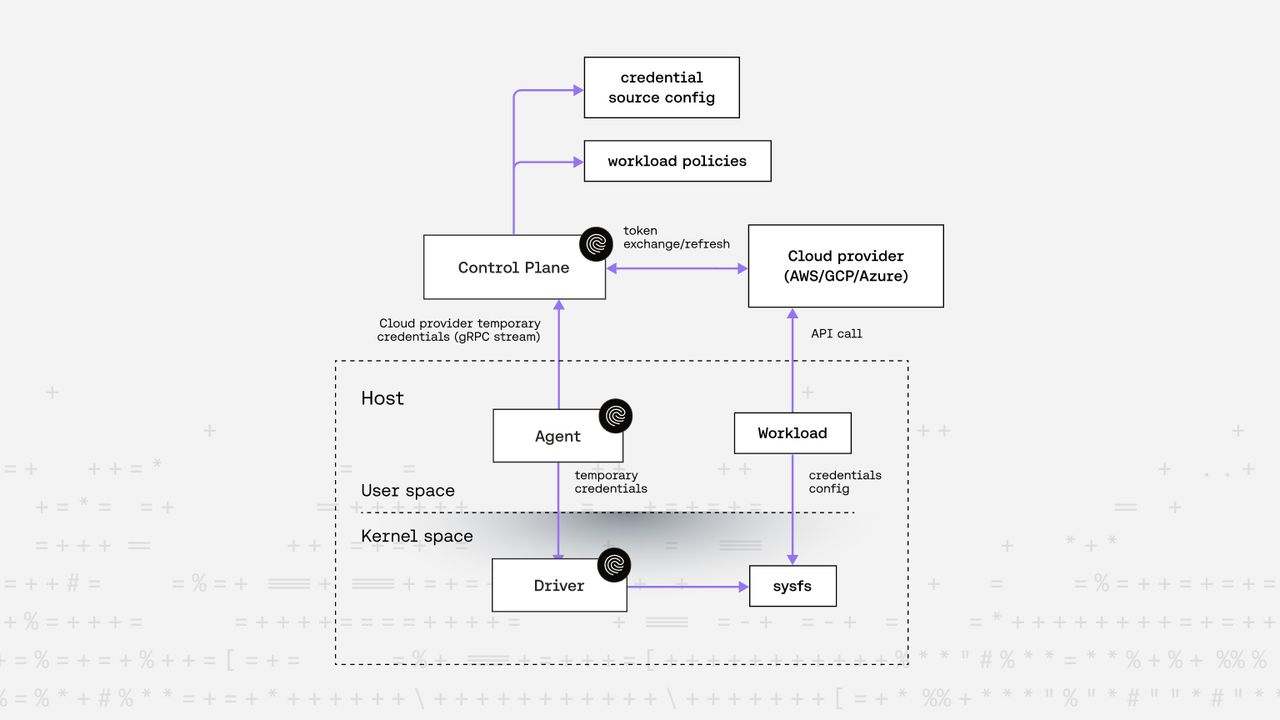
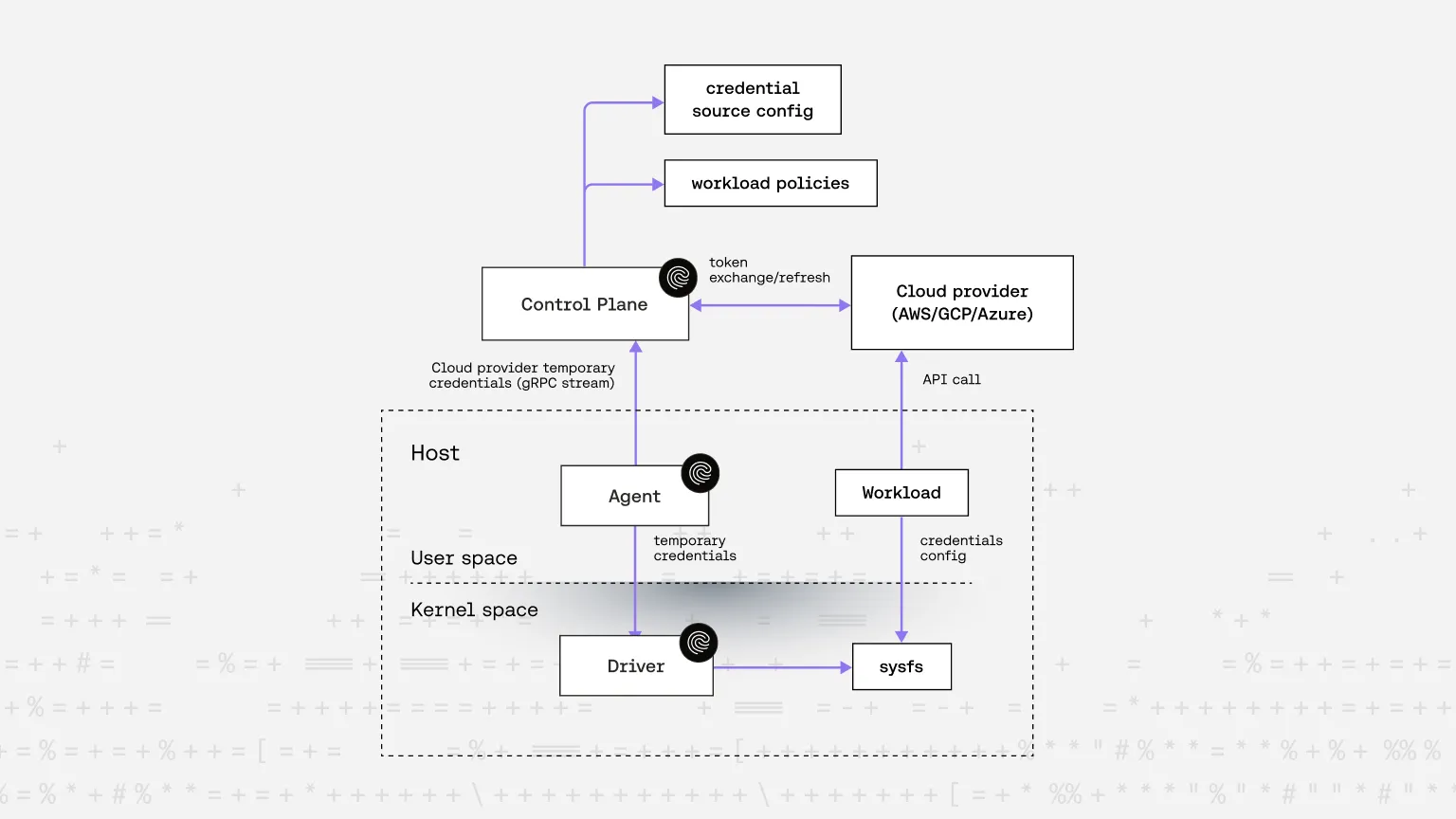
- Kernel-level visibility: A Linux kernel module observes all network activity of workloads (processes and containers) in real time.
- User-space coordination: A user-space agent configures the kernel module with policies that define identity assignment and communication rules.
- SPIFFE SVIDs as workload identities: Each workload receives a SPIFFE ID based on runtime attributes such as binary path, command-line args, workload name, namespace, or deployment metadata.
- On-demand cloud credential issuance: Riptides generates a short-lived identity token (SVID) and exchanges it for cloud-specific temporary credentials via standard federation mechanisms.
- Secure credential delivery: Riptides supports two secure credential delivery options to fit different use cases and business requirements:
- Dynamic
sysfsdelivery — Credentials are exposed just-in-time viasysfs, scoped so only the requesting workload can read them at the exact moment they call a cloud API. - On-the-wire injection — Riptides intercepts outbound cloud API requests and replaces authentication headers with valid, short-lived credentials.
- Dynamic
- Zero code changes required: Existing cloud SDKs (AWS, GCP, Azure) continue to work either with a simple config tweak to read credentials from the
sysfspath, or completely transparently when using the on-the-wire injection. - Multi-cloud ready: No need for cloud-specific agents. Riptides works across AWS, GCP, and Azure out of the box.
- Centralized governance: Identity policies and permissions are managed centrally, making governance, auditing, and policy enforcement consistent and scalable.
The diagram below shows the high-level flow of the sysfs based solution. In a follow-up post, we’ll cover the on-the-wire credential replacement approach.
Demo: Using Riptides prepared GCP credentials from sysfs with the gcloud CLI
In the following recording, you’ll see a simple demo showing how credentials prepared by Riptides in sysfs can be used with the gcloud CLI.

-
Initial state, no credentials available
First, you can see that thegcp_credentials.jsonfile is not accessible.
This is because the credential source configuration and policies, which Riptides uses to generate credentials for thegcloudCLI, have not yet been created. -
Grant workload access to GCP resources
Next, we run the step labeled# Allow workload access to GCP resources.
In this step, we create the required credential source configuration and policies. These are defined as Kubernetes custom resources, which are consumed by the Riptides Control Plane:apiVersion: core.riptides.io/v1alpha1 kind: CredentialSource metadata: name: gcp-wif spec: gcp: serviceAccount: demo-56@deft-diode-457816-s2.iam.gserviceaccount.com oidcProviderId: //iam.googleapis.com/projects/432279690143/locations/global/workloadIdentityPools/demo/providers/demo2 --- apiVersion: core.riptides.io/v1alpha1 kind: WorkloadCredential metadata: name: gcp-access-token spec: workloadID: staging/demo/gcloud-cli credentialSource: gcp-wif --- apiVersion: core.riptides.io/v1alpha1 kind: WorkloadIdentity metadata: name: gcloud-cli spec: scope: agentGroup: id: riptides/agentGroup/demo selectors: - process:binary:path: /snap/google-cloud-cli/364/usr/bin/python3.10 process:gid: 1000 process:uid: 501 workloadID: staging/demo/gcloud-cliWe’ll cover the full configuration process in a separate post to avoid overloading this one with too much detail. Briefly:
- WorkloadCredential specifies which credentials a workload identity should receive.
- CredentialSource defines how and where to obtain those credentials.
- WorkloadIdentity describes the attributes of a workload, which must match at runtime for it to assume the referenced workload identity.
Once configured, Riptides securely obtains the credentials from the cloud provider and delivers them to
sysfson the relevant node. -
Access to credentials restricted to
gcloudworkload In the step labeled# Access is restricted so that only the designated workload can read its assigned credentials, we verify that no other process can access these credentials. Only the process matching the configuredWorkloadIdentityattributes can read them. -
Successful authentication
After that, thegcloud auth logincommand succeeds because the credentials are now available insysfs.
Note the UUID after/sys/kernel/riptides/credentials/in the path; this is derived from the workload’s SPIFFE ID and scopes the credentials to that workload.
This ensures that no other workload can access this path. The Linux kernel module verifies workload attributes at runtime to determine the workload’s identity. Only if the UUID derived from this identity matches the UUID in the path is the process allowed to read its contents. -
Listing VM instances
Once logged in, we successfully list VM instances using thegcloudCLI. -
Revoking access
Finally, in the step labeled# Remove GCP access and try again, we delete the credential source configuration and policies for thegcloudworkload.
As expected, listing VM instances now fails because the credential file has been removed fromsysfs.
In short: you never have to handle GCP credentials manually; Riptides provisions, delivers, scopes, and refreshes them securely and automatically, exactly when needed.
5. Why do we advocate for SPIFFE IDs as workload identity
We believe every workload deserves a verifiable, unique, and trusted identity and SPIFFE provides exactly that.
Key benefits of SPIFFE
- Cloud-agnostic identity format: One consistent identity format across all environments, thus there is no need to adapt to cloud-specific credential formats.
- Identity-first trust model: Credentials are issued only after workload identity is verified.
In traditional models, credentials are distributed to a host, and any process on that host can use them, regardless of what it is. Riptides changes that:
- A workload’s SPIFFE ID is securely issued and verified.
- Only then are short-lived cloud credentials issued, scoped to that identity.
- The Kernel module enforces which identity a workload can be assigned based on workload attributes.
This enforces strict credential isolation, reducing the risk of lateral movement, privilege escalation, and credential leakage.
Riptides brings zero-secret, per-workload identity to any Linux system, with no application code changes required. It eliminates manual credential distribution and ensures that each workload receives the right credentials, at the right time, in the most secure way possible.
Final Thoughts
Modern cloud-native federation is a step forward — but it still places a hidden burden on developers and operators. Cross-cloud federation helps, but it’s not workload-aware, not granular, and certainly not zero-trust.
Riptides provides a truly secure, zero-touch identity solution:
- Fine-grained, SPIFFE-based workload identities
- Secure, ephemeral credentials
- No secrets stored
- Seamless multi-cloud integration
If you’re building secure cloud-native systems at scale, it’s time to rethink how you manage non-human identity. Let Riptides handle it for you securely, automatically, and correctly.
In our next post, we’ll dive deeper into the on-the-wire credential injection method and demonstrate how Riptides works in practice with real applications and cloud providers, all without secrets. Stay tuned.
If you enjoyed this post, follow us on LinkedIn and X for more updates. If you'd like to see Riptides in action, get in touch with us for a demo.