tokenex adds Vault & OpenBao support: Exchanging ID tokens (JWTs) for secrets without static credentials
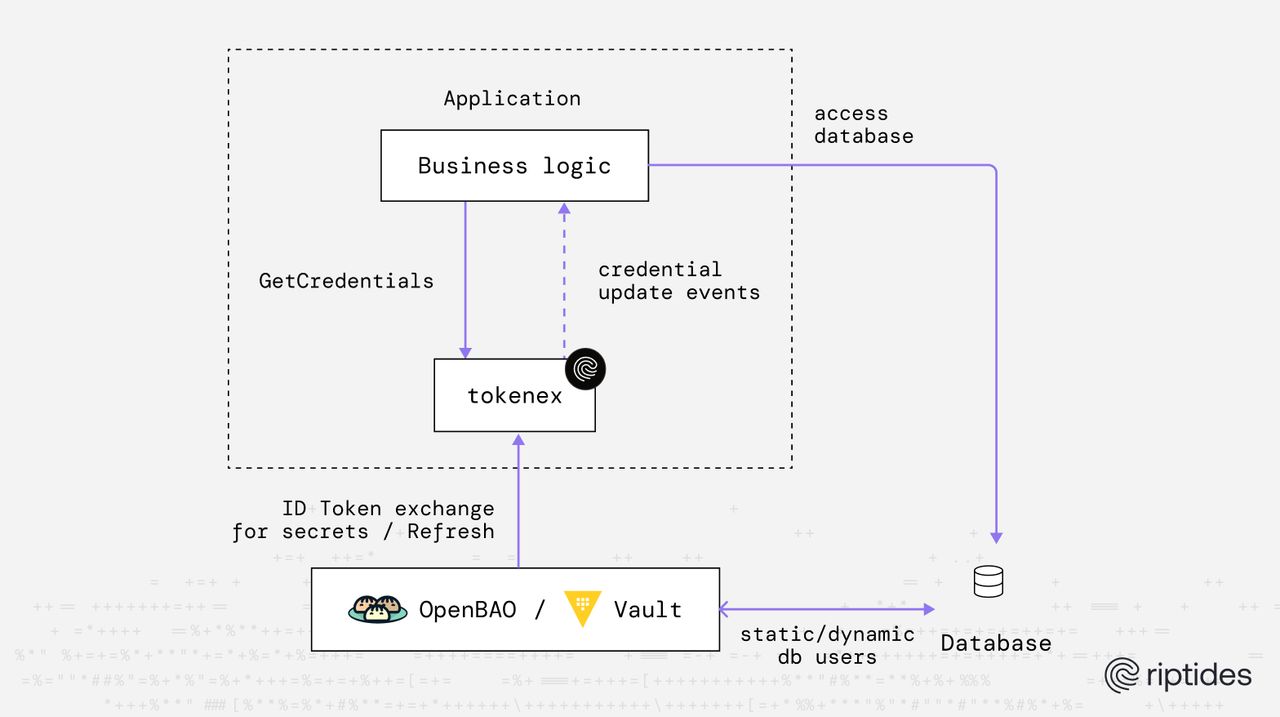
Introducing Vault & OpenBao support in tokenex open source library
Since its first release, tokenex has focused on identity-first credential acquisition exchanging short-lived identity tokens (JWT) for cloud credentials just-in-time, without baking secrets into code, files, or images.
Today, we’re extending that model beyond cloud IAM.
We’re excited to announce native support for HashiCorp Vault and OpenBao as credential providers in tokenex. With this new capability, tokenex can exchange ID tokens (JWTs) for secrets stored in Vault or OpenBao, using their built-in JWT authentication flows; no static Vault tokens, no long-lived credentials, and no manual secret distribution.
This addition makes Vault and OpenBao first-class participants in tokenex’s identity-driven workflow, allowing applications to retrieve both:
- cloud-native credentials (AWS, GCP, Azure, OCI), and
- infrastructure or application secrets (databases, APIs, internal services)
using the same identity-based access pattern.
In the next section, we’ll explain why this integration matters, how it complements tokenex’s existing capabilities, and what it unlocks for teams building secure, scalable systems.
Why we built this feature
tokenex was originally created to provide a unified, consistent interface for obtaining and refreshing cloud credentials across multiple providers including AWS, GCP, Azure, and OCI — by exchanging identity tokens for temporary credentials and streaming those credentials over a channel so applications never have to implement bespoke refresh logic themselves.
It already supports:
- AWS: Exchanging ID tokens for temporary session credentials via Workload Identity Federation
- GCP: Exchanging ID tokens for access tokens via federated identity
- Azure: Exchanging ID tokens for access tokens using OAuth and Entra ID
- OCI: Exchanging ID tokens for User Principal Session Tokens (UPST)
- Generic token passthrough and Kubernetes secret watching for flexible integrations
This model enables developers to write single credential consumption logic, regardless of provider, while tokenex handles:
- Identity token exchange
- Credential refresh and rotation
- Streaming updates to applications
While this already removed much of the complexity around cloud authentication, there was still a clear gap: enterprise secrets management.
Many real‑world systems don’t only need cloud API credentials. They also rely on database credentials, API keys, and other sensitive configuration, which are typically managed by platforms like HashiCorp Vault or OpenBao. These systems excel at issuing dynamic, short‑lived secrets, enforcing least privilege, and providing strong auditability, but consuming those secrets safely still requires glue code and identity plumbing.
By adding Vault/OpenBao as a first‑class credentials provider, tokenex now allows workloads to:
- Exchange a JWT (ID token) for secrets using Vault/OpenBao JWT authentication
- Retrieve static or dynamic secrets (for example, database credentials) without embedding Vault‑specific logic
With this addition, tokenex evolves from a cloud‑credential helper into a general identity‑to‑secret exchange layer. Applications authenticate once using identity, and tokenex handles the rest, regardless of whether the target is a cloud API or a centralized secrets manager.
This feature is a natural extension of tokenex’s core philosophy:
minimize credential handling in applications, centralize trust in identity, and let platforms issue short‑lived secrets on demand.
Demo: Using tokenex with OpenBao to publish PostgreSQL credentials
1. Deploy OpenBao and PostgreSQL
In this step, we deploy OpenBao and PostgreSQL as containers using Docker Compose.
OpenBao configuration:
Create a file named vault.hcl with the following contents:
ui = true

storage "file" {
  path = "/vault/data"
}

listener "tcp" {
  address     = "0.0.0.0:8200"
  tls_disable = 1
}

api_addr     = "http://127.0.0.1:8200"
cluster_addr = "http://127.0.0.1:8201"

plugin_auto_register = true
plugin_auto_download = true
plugin_download_behavior = "fail"

plugin_directory = "/opt/openbao/plugins"Note: For simplicity, TLS is disabled and file-based storage is used. This configuration is suitable for demos and local development only.
Docker Compose setup
Create a docker-compose.yml file:
services:
  openbao:
    restart: unless-stopped
    image: openbao/openbao:2.4
    container_name: openbao
    ports:
      - "8200:8200"
    cap_add:
      - IPC_LOCK
    volumes:
      - ./vault.hcl:/vault/config/vault.hcl:ro
      - vault-data:/vault/data
    environment:
      VAULT_ADDR: "http://127.0.0.1:8200"
    command: vault server -log-level=debug -config=/vault/config/vault.hcl

  postgres:
    image: postgres:18
    container_name: postgres
    restart: unless-stopped
    shm_size: 128mb
    environment:
      POSTGRES_USER: postgres
      POSTGRES_PASSWORD: mysecretpassword
    ports:
      - "5432:5432"
    volumes:
      - pg-data:/var/lib/postgresql

volumes:
  vault-data:

  pg-data:
2. Initialize and unseal OpenBAO
docker exec openbao bao operator init -format=json > vault-init.json

docker exec openbao bao operator unseal $(jq -r '.unseal_keys_b64[0]' vault-init.json)
docker exec openbao bao operator unseal $(jq -r '.unseal_keys_b64[1]' vault-init.json)
docker exec openbao bao operator unseal $(jq -r '.unseal_keys_b64[2]' vault-init.json)
3. Configure JWT authentication in OpenBao
# Enable JWT authentication method
docker exec -e VAULT_TOKEN=$(jq -r '.root_token' vault-init.json) \
  openbao bao auth enable jwt
# Configure the JWT authentication method
docker exec -e VAULT_TOKEN=$(jq -r '.root_token' vault-init.json) \
openbao bao write auth/jwt/config \
bound_issuer="<OIDC_ISSUER_URL>" \
oidc_discovery_url="<OIDC_DISCOVERY_URL>" \
oidc_client_id="" \
oidc_client_secret=""-
bound_issuer:<OIDC_ISSUER_URL>– Issuer URL of your OIDC provider -
oidc_discovery_url:<OIDC_DISCOVERY_URL>– URL for OIDC metadata discovery (keys, endpoints)
# Create a named role 'secret-reader' that authorizes JWTs with specific subject and audience claims
# Assign the 'read-secrets' policy to this role
docker exec -e VAULT_TOKEN=$(jq -r '.root_token' vault-init.json) openbao \
  bao write auth/jwt/role/secret-reader \
    user_claim="sub" \
    bound_audiences="<JWT_AUDIENCE>" \
    bound_subject="<JWT_SUB_CLAIM>" \
    token_policies="read-secrets" \
    token_type="service" \
    expiration_leeway=150 \
    not_before_leeway=150 \
    role_type="jwt"
-
bound_audiences:<JWT_AUDIENCE>– Expectedaudclaim in JWT tokens -
bound_subject:<JWT_SUB_CLAIM>– Expectedsubclaim in JWT tokens
# Create the 'read-secrets' policy
# Grants read access to the 'pg-dyn-dbuser' dynamic DB credential and the 'pg-dbuser1' static DB credential
docker exec -i -e VAULT_TOKEN=$(jq -r '.root_token' vault-init.json) openbao \
  bao policy write read-secrets -<<EOF
path "database/creds/pg-dyn-dbuser" {
  capabilities = ["read"]
}

path "database/static-creds/pg-dbuser1" {
  capabilities = ["read"]
}
EOF
4. Configure database secrets engine
In this step, we enable the database secrets engine in OpenBAO and configure it to manage credentials for PostgreSQL, both dynamic (temporary) and static users.
# Enable database secrets engine
docker exec -e VAULT_TOKEN=$(jq -r '.root_token' vault-init.json) openbao \
  bao secrets enable database
Configure the connection to PostgreSQL:
# Configure connection to PostgreSQL
docker exec -e VAULT_TOKEN=$(jq -r '.root_token' vault-init.json) openbao \
  bao write database/config/my-postgresql-database \
    plugin_name="postgresql-database-plugin" \
    allowed_roles="pg-dyn-dbuser, pg-dbuser1" \
    connection_url="postgresql://{{username}}:{{password}}@postgres:5432" \
    username="postgres" \
    password="mysecretpassword"
Configure a dynamic role for temporary PostgreSQL users Dynamic roles allow OpenBAO to generate short-lived database credentials automatically:
# Configure a role that maps a name in OpenBAO to an SQL statement to execute to create the database credential
docker exec -e VAULT_TOKEN=$(jq -r '.root_token' vault-init.json) openbao \
  bao write database/roles/pg-dyn-dbuser \
    db_name="my-postgresql-database" \
    creation_statements="CREATE ROLE \"{{name}}\" WITH LOGIN PASSWORD '{{password}}' VALID UNTIL '{{expiration}}'; \
        GRANT SELECT ON ALL TABLES IN SCHEMA public TO \"{{name}}\";" \
    default_ttl="1h" \
max_ttl="24h"- Note that
{{name}},{{password}}, and{{expiration}}are dynamically populated by OpenBAO.
Create a static PostgreSQL user This user will be referenced by a static role in OpenBAO.
# Create a database user named 'dbuser1' in the PostgreSQL
docker exec -e PGPASSWORD=mysecretpassword  postgres psql -U postgres -c "CREATE USER \"dbuser1\" WITH PASSWORD 'pwd1'; GRANT SELECT ON ALL TABLES IN SCHEMA public TO \"dbuser1\";"
Configure a static role in OpenBAO Static roles allow OpenBAO to manage existing database users without creating new ones:
# Configure a static role that creates a link to a user named 'dbuser1' in the PostgreSQL database
docker exec -e VAULT_TOKEN=$(jq -r '.root_token' vault-init.json) openbao \
  bao write database/static-roles/pg-dbuser1 \
    db_name="my-postgresql-database" \
    username="dbuser1" \
rotation_period="1d"- Note -
pg-dbuser1maps to the existing PostgreSQL userdbuser1androtation_perioddefines how often the password of the database user should be rotated
5. Demo application
This demo application logs both dynamic and static database credentials to stdout as they are issued and refreshed by OpenBAO.
package main

import (
 "context"
 "log"
 "os"
 "os/signal"
 "sync"
 "syscall"

 "emperror.dev/errors"
 "github.com/go-logr/logr"
 "github.com/iand/logfmtr"

 "go.riptides.io/tokenex/pkg/credential"
 "go.riptides.io/tokenex/pkg/token"
 "go.riptides.io/tokenex/pkg/vault"
)

func main() {
 // Create a cancellable context
 ctx, cancel := context.WithCancel(context.Background())
 defer cancel()

 // Create a logger
 opts := logfmtr.DefaultOptions()
 opts.Humanize = true
 opts.Colorize = true
 opts.AddCaller = true
 opts.CallerSkip = 2

 logger := logfmtr.NewWithOptions(opts)
 logfmtr.SetVerbosity(2)

 // Create a wait group to track goroutines
 var wg sync.WaitGroup

 // Set up graceful shutdown
 signalChan := make(chan os.Signal, 1)
 signal.Notify(signalChan, syscall.SIGINT, syscall.SIGTERM)
 logger.Info("Press Ctrl+C to stop...")

 go func() {
  sig := <-signalChan
  logger.Info("Received signal, shutting down...", "sig", sig)
  cancel()
 }()

 // Create an identity token provider
 // under the hood the credential provider uses OCI workload identity federation to fetch user principal session tokens from OCI
 // the credential provider exchanges an input ID token for an OCI user principal session token
 // the input ID token can be obtained from any OIDC compliant IDP (e.g. Google, Microsoft, Auth0, Okta, etc.)

 // for this example, we use a static ID token provider that returns a hardcoded ID token issued by an OIDC compliant IDP
 // in a real application, you would implement the `token.IdentityTokenProvider` interface to create a dynamic ID token provider that fetches the ID token from an OIDC compliant IDP
 idTokenProvider := token.NewStaticIdentityTokenProvider("<id-token-issued-by-idp>")

 // Create the Vault credentials provider
 vaultProvider, err := vault.NewCredentialsProvider(ctx, logger, "http://localhost:8200", nil)
 if err != nil {
  logger.Error(err, "Failed to create Vault credentials provider")
 }

 dynDBCredsChan, err := vaultProvider.GetCredentials(
  ctx,
  idTokenProvider,
  vault.WithJWTAuthMethodPath("jwt"),
  vault.WithJWTAuthRoleName("secret-reader"),
  vault.WithSecretFullPath("database/creds/pg-dyn-dbuser"),
 )
 if err != nil {
  logger.Error(err, "Failed to get dynamic database credentials")
 }

 // Process dynamic database credentials
 wg.Add(1)
 credentialsConsumer(logr.NewContext(ctx, logger.WithValues("secret_engine", "database", "credential_type", "dynamic", "secret_path", "/creds/pg-dyn-dbuser")), &wg, dynDBCredsChan, logDBCreds)

 staticDBCredsChan, err := vaultProvider.GetCredentials(
  ctx,
  idTokenProvider,
  vault.WithJWTAuthMethodPath("jwt"),
  vault.WithJWTAuthRoleName("secret-reader"),
  vault.WithSecretFullPath("database/static-creds/pg-dbuser1"),
 )
 if err != nil {
  logger.Error(err, "Failed to get static database credentials")
 }

 // Process static database credentials
 wg.Add(1)
 credentialsConsumer(logr.NewContext(ctx, logger.WithValues("secret_engine", "database", "credential_type", "static", "secret_path", "/static-creds/pg-dbuser1")), &wg, staticDBCredsChan, logDBCreds)

 // Wait for all goroutines to finish
 wg.Wait()
}

func credentialsConsumer(ctx context.Context, wg *sync.WaitGroup, credsChan <-chan credential.Result, credsLogger func(logr.Logger, *credential.VaultSecret)) {
 go func() {
  defer wg.Done()

  logger := logr.FromContextOrDiscard(ctx)
  for {
   select {
   case creds, ok := <-credsChan:
    if !ok {
     logger.Info("credentials channel closed")

     return
    }
    if creds.Err != nil {
     logger.Error(creds.Err, "Error receiving credentials", errors.GetDetails(creds.Err)...)

     return
    }

    dbSecret, ok := creds.Credential.(*credential.VaultSecret)
    if !ok {
     logger.Error(errors.New("invalid credential type"), "expected *credential.VaultSecret")

     return
    }
    credsLogger(logger, dbSecret)

   case <-ctx.Done():
    log.Println("Context cancelled, shutting down credentials handler")

    return
   }
  }
 }()
}

func logDBCreds(logger logr.Logger, dbSecret *credential.VaultSecret) {
 // Database secrets typically contain username and password
 username := dbSecret.Data["username"].(string)
 password := dbSecret.Data["password"].(string)

 logger.Info("credential", "username", username, "password", password)
}
Sample output:
0 info  | 11:00:29.398131 | Press Ctrl+C to stop...        caller=main.go:41
0 info  | 11:00:29.428805 | credential                     caller=main.go:220 secret_engine=database credential_type=static secret_path=/static-creds/pg-dbuser1 username=dbuser1 password=Qj-6l6OWghtonpucH6Vd
2 info  | 11:00:29.428858 | Published Vault secret         logger=vault_credentials caller=creds.go:245 secret_path=database/static-creds/pg-dbuser1 expiresAt="2026-01-15 13:51:17.428782 +0100 CET m=+6648.032605334"
2 info  | 11:00:29.428879 | Using RefreshOn time from credentials logger=vault_credentials caller=creds.go:252 refreshOn="2026-01-15 13:51:22.428782 +0100 CET m=+6653.032605334"
1 info  | 11:00:29.428885 | Scheduling credential refresh  logger=vault_credentials caller=creds.go:260 refreshIn=1h50m52.999899041s refreshBuffer=0s secret_path=database/static-creds/pg-dbuser1
2 info  | 11:00:29.446979 | Published Vault secret         logger=vault_credentials caller=creds.go:245 secret_path=database/creds/pg-dyn-dbuser expiresAt="2026-01-15 12:15:29.446969 +0100 CET m=+900.050791918"
0 info  | 11:00:29.446989 | credential                     caller=main.go:220 secret_engine=database credential_type=dynamic secret_path=/creds/pg-dyn-dbuser username=v-jwt-ript-pg-dyn-d-QKRDQydUME1zlQtgdyY6-1768474829 password=t7gZd5h-7BwZr2lB0iFO
1 info  | 11:00:29.447002 | Scheduling credential refresh  logger=vault_credentials caller=creds.go:260 refreshIn=11m57.937258345s refreshBuffer=3m2.06274128s secret_path=database/creds/pg-dyn-dbuser
What we see in the output:
-
For the static PostgreSQL user
dbuser1, the password is managed and rotated by the OpenBAO database secrets engine.
The user was originally created with the passwordpwd1. OpenBAO rotates this password only when the rotation time is reached, atexpiresAt="2026-01-15 13:51:17.428782 +0100 CET".Because this is a static role, tokenex cannot retrieve a new password before the rotation occurs. It must wait until OpenBAO performs the rotation.
Once the password has been rotated, Tokenex re-fetches and publishes the updated credentials shortly after, atrefreshOn="2026-01-15 13:51:22.428782 +0100 CET". -
For the dynamic PostgreSQL user
v-jwt-ript-pg-dyn-d-QKRDQydUME1zlQtgdyY6-1768474829, OpenBAO creates a brand-new database user with a unique password.
This credential is short-lived and expires in approximately 15 minutes.Unlike static credentials, tokenex can proactively request a new dynamic credential before the current one expires.
In this example, a refresh is scheduled atrefreshIn=11m57.937258345swith arefreshBuffer=3m2.06274128s, ensuring continuous access without relying on password rotation.
Example use cases
1. Zero-Trust service & database access
Workloads authenticate using a JWT and exchange it for secrets at runtime:
- Short-lived database credentials (e.g. PostgreSQL)
- Service-specific API keys or tokens
- Automatically rotated by Vault/OpenBao
- Fully auditable and identity-scoped
No secrets in config files, CI pipelines, or environment variables. No shared credentials between services.
2. Trusted secret orchestrators
A trusted orchestrator (Kubernetes controller, job runner, workflow engine) can:
- Authenticate using its own workload identity
- Use Tokenex to fetch secrets on behalf of workloads
- Enforce centralized policy, intent, and approval flows
- Act as a controlled trust boundary in regulated environments
Final thoughts
By combining:
- Identity-based authentication
- Centralized secrets management
- Short-lived credentials
- Explicit, auditable token exchange
you end up with systems that are:
- Easier to reason about
- Harder to misuse
- Safer by default
tokenex doesn’t replace Vault or OpenBao — it connects them seamlessly to modern identity systems, allowing secrets to be accessed only when and where identity has been verified.
If you enjoyed this post, follow us on LinkedIn and X for more updates. If you'd like to see Riptides in action, get in touch with us for a demo.