Secretless Azure access with tokenex: Federated Identity via User-Assigned Managed Identity
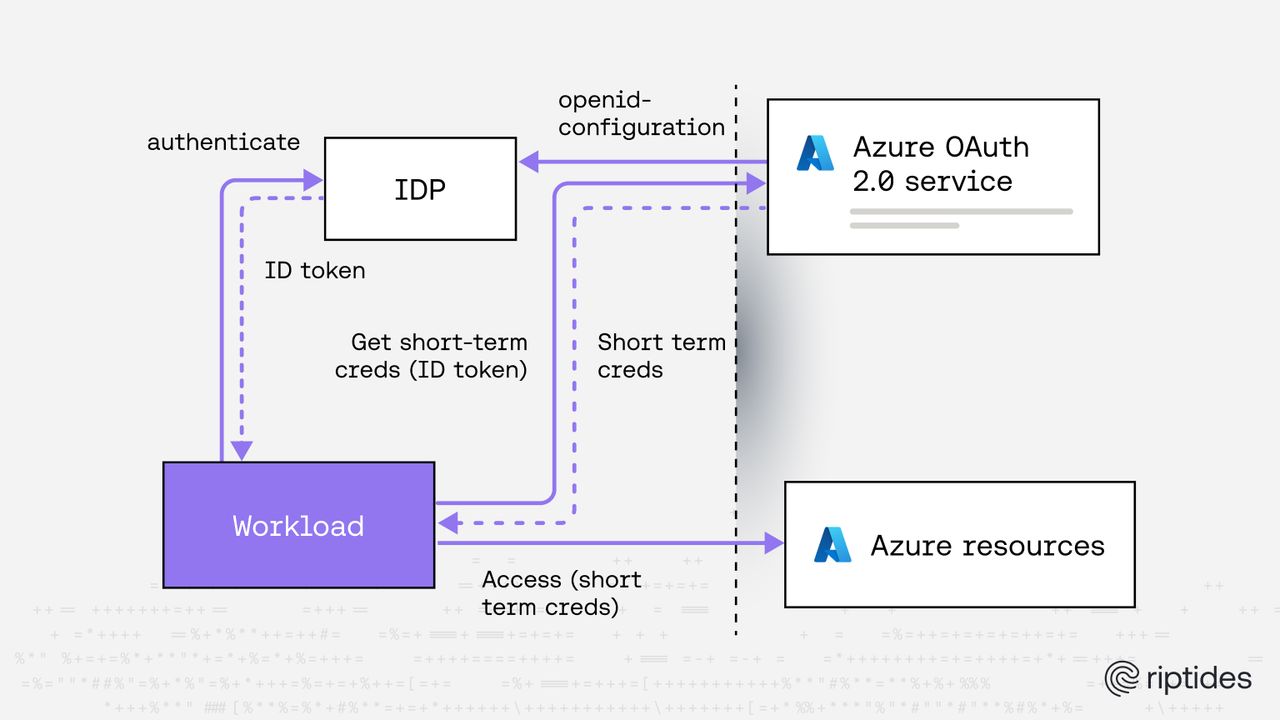
Non-human identities (services, agents, CI/CD pipelines, workloads, etc.) are now the primary actors in modern cloud systems. Yet many systems still rely on:
- Client secrets stored in CI systems
- Long-lived service principal credentials
- Manually rotated keys
This is operationally expensive and security-fragile.
tokenex is an open-source Go library that simplifies the process of providing short-lived credentials from various providers. Instead of embedding long-lived secrets or tightly coupling to a specific cloud SDK authentication flow, tokenex allows you to exchange identity tokens from external identity providers for short-lived cloud-native access tokens.
In other words:
Your workload proves who it is using an external identity provider. tokenex exchanges that identity for native short-lived cloud credentials. The target platform, whether Azure, AWS, GCP, OCI, or any other supported provider, then decides what the workload can do using its own identity primitive (Managed Identity, IAM Role, Service Account, etc.) and its native authorization model (RBAC, IAM policies, resource policies, and so on).
This makes tokenex ideal for modern zero-trust, federated, multi-cloud environments.
Why secretless matters
What does “secretless” really mean?
“Secretless” does not mean there are no credentials involved. It means:
- No long-lived client secrets
- No stored access keys, api keys, tokens, etc
- No credentials written to disk
- No static environment variables containing secrets
Instead, credentials are derived dynamically based on identity, are short-lived, and exist only in memory for the minimum time required.
The security advantage
Traditional approaches often rely on:
- Service principal secrets stored in CI/CD systems
- Static cloud access keys baked into container images
- Credentials written to configuration files
- Long-lived tokens injected as environment variables
These become high-value targets.
If a zero-day vulnerability, dependency compromise, or supply chain attack allows arbitrary code execution inside a workload, the attacker’s first move is almost always:
Search the filesystem and environment for credentials.
If secrets are stored at rest in files, configs, or environment variables, they can be harvested and reused elsewhere.
With a secretless model:
- No static cloud credentials exist on disk
- No reusable long-lived secrets are embedded in the workload
- Access tokens are short-lived and scoped
- Credentials are exchanged just-in-time
- Tokens expire quickly and cannot be reused indefinitely
Even if an attacker gains runtime execution, there are no persistent secrets to extract and exfiltrate for long-term abuse.
Why short-lived credentials change the threat model
Short-lived credentials dramatically reduce blast radius:
- Tokens expire automatically
- Compromised credentials lose value quickly
- Replay windows are narrow
- There is no static secret to rotate after an incident
This is especially important in the context of:
- Zero-day exploits
- Dependency confusion attacks
- Malicious container base images
- CI/CD pipeline compromises
Security through ephemerality
The combination of:
- External identity assertion
- Token exchange
- Short-lived native cloud credentials
- No stored secrets
creates a model where authentication is dynamic and authorization is enforced natively without leaving reusable artifacts behind.
This is not just an operational improvement; it is a fundamental shift in security posture. Secretless is not about convenience. It is about eliminating credential persistence as an attack surface.
Sample Go application using tokenex
In the following section, we’ll walk through a concrete example: a simple Go application that uses tokenex to obtain an Azure access token and then invokes an Azure API using that token for authentication.
To get there, we will:
- Configure Azure to trust an external identity using federated credentials
- Bind that trust to a User-Assigned Managed Identity (UAMI)
- Use tokenex’s Azure credentials provider to exchange an external ID token for an Azure access token
- Use the returned access token inside a Go application to authenticate and call an Azure API
The goal is to demonstrate an end-to-end, secretless flow where:
- Identity is asserted externally
- Credentials are exchanged dynamically
- Authorization is enforced by Azure RBAC
By the end, you’ll have a minimal but production-relevant example showing how to invoke Azure APIs securely without storing Azure secrets in your application.
Azure setup: Federated Identity with User-Assigned Managed Identity (UAMI)
Below are the required Azure configuration steps to enable federation.
1️⃣ Create a User-Assigned Managed Identity
az identity create --name demo-uami --resource-group demo-rg --location <location>Capture the output values:
clientIdprincipalIdid
2️⃣ Assign a Role to the Managed Identity
Grant the identity permission to access resources in the demo-rg resource group.
az role assignment create --assignee <principalId> --role Reader --scope /subscriptions/<subscription-id>/resourceGroups/demo-rgAdjust the role and scope as needed for your demo.
3️⃣ Create Federated Identity Credential
Now configure Azure to trust your external identity provider’s ID token.
az identity federated-credential create --name demo-fic --identity-name demo-uami --resource-group demo-rg --issuer https://your-idp.example.com --subject <your-subject-claim> --audience api://AzureADTokenExchangeImportant fields:
issuer→ must match theissclaim of your ID tokensubject→ must match thesubclaim of your ID tokenaudience→ must beapi://AzureADTokenExchange
Once configured, Azure will accept valid ID tokens from your external IdP and exchange them for Azure access tokens scoped to the user assigned managed identity.
Demo application
package main

import (
	"context"
	"log/slog"
	"os"
	"os/signal"
	"sync"
	"syscall"
	"time"

	"github.com/Azure/azure-sdk-for-go/sdk/azcore"
	"github.com/Azure/azure-sdk-for-go/sdk/azcore/policy"
	"github.com/Azure/azure-sdk-for-go/sdk/resourcemanager/resources/armresources"
	"github.com/go-logr/logr"

	"go.riptides.io/tokenex/pkg/azure"
	"go.riptides.io/tokenex/pkg/credential"
	"go.riptides.io/tokenex/pkg/token"
)

// accessTokenStore is a thread-safe store for an Azure access token.
type accessTokenStore struct {
	azcore.TokenCredential

	mu          sync.RWMutex
	accessToken azcore.AccessToken
}

func (s *accessTokenStore) Set(token *credential.Oauth2Creds) {
	s.mu.Lock()
	defer s.mu.Unlock()

	s.accessToken.Token = token.AccessToken
	s.accessToken.ExpiresOn = token.Expiry
}

func (s *accessTokenStore) GetToken(ctx context.Context, _ policy.TokenRequestOptions) (azcore.AccessToken, error) {
	s.mu.RLock()
	defer s.mu.RUnlock()

	return s.accessToken, nil
}

func main() {
	ctx, stop := signal.NotifyContext(context.Background(), os.Interrupt, syscall.SIGTERM)
	defer stop() // clean up signal handler

	logger := logr.FromSlogHandler(slog.Default().Handler())
	logger.Info("Press Ctrl+C to stop...")

	// setup credential provider to receive Azure credentials
	credProvider, err := azure.NewCredentialsProvider(ctx, logger)
	if err != nil {
		logger.Error(err, "failed to create Azure credentials provider")

		return
	}

	// under the hood, the credential provider uses Microsoft Entra ID workload identity federation to fetch user principal session tokens from Microsoft Entra ID service
	// the credential provider exchanges an input ID token for an Azure user principal session token
	// the input ID token can be obtained from any OIDC compliant IDP (e.g. Google, Microsoft, Auth0, Okta, etc.)

	// for this example, we use a static ID token provider that returns a hardcoded ID token issued by an OIDC compliant IDP
	// in a real application, you would implement the `token.IdentityTokenProvider` interface to create a dynamic ID token provider that fetches the ID token from an OIDC compliant IDP
	idTokenJwt := os.Getenv("ID_TOKEN_JWT")
	if idTokenJwt == "" {
		logger.Error(nil, "ID_TOKEN_JWT environment variable is not set")

		return
	}
	azSubscriptionId := os.Getenv("AZURE_SUBSCRIPTION_ID")
	if azSubscriptionId == "" {
		logger.Error(nil, "AZURE_SUBSCRIPTION_ID environment variable is not set")

		return
	}
	azClientId := os.Getenv("AZURE_CLIENT_ID")
	if azClientId == "" {
		logger.Error(nil, "AZURE_CLIENT_ID environment variable is not set")

		return
	}
	azTenantId := os.Getenv("AZURE_TENANT_ID")
	if azTenantId == "" {
		logger.Error(nil, "AZURE_TENANT_ID environment variable is not set")

		return
	}

	resourseGroupName := os.Getenv("AZURE_RESOURCE_GROUP_NAME")
	if resourseGroupName == "" {
		logger.Error(nil, "AZURE_RESOURCE_GROUP_NAME environment variable is not set")

		return
	}

	idTokenProvider := token.NewStaticIdentityTokenProvider(idTokenJwt)

	creds, err := credProvider.GetCredentials(ctx,
		idTokenProvider, // supplies the ID token issued by an OIDC compliant IDP for the application(workload) that is going to use the Azure service principal session tokens for authentication.
		azure.WithClientID(azClientId),
		azure.WithTenantID(azTenantId),
		azure.WithScope("https://management.azure.com/.default"),
	)
	if err != nil {
		logger.Error(err, "failed to get Azure credentials")

		return
	}

	accessToken := &accessTokenStore{}

	// retrieve Azure credentials and updates before they expire for the identity that corresponds to the provided ID token
	go func() {
		defer stop()

		for {
			select {
			case <-ctx.Done():
				return
			case credentialEvent := <-creds:
				if credentialEvent.Err != nil {
					logger.Error(credentialEvent.Err, "failed to get Azure credentials")

					return
				}

				token, ok := credentialEvent.Credential.(*credential.Oauth2Creds)
				if !ok {
					logger.Error(err, "failed to assert credential type")

					return
				}

				// update the access token used by the application to authenticate to Azure services
				accessToken.Set(token)

				logger.Info("received Azure credentials", "expiry", token.Expiry)
			}
		}
	}()

	go func() {
		defer stop()

		// simulate application running and using the Azure credentials for authentication to Azure services
		// periodically check and print resources that appeared in the resource group to demonstrate that the credentials are being refreshed and can be used to authenticate to Azure services

		armresourcesClient, err := armresources.NewClient(azSubscriptionId, accessToken, nil)
		if err != nil {
			logger.Error(err, "failed to create Azure Resource Management client")

			return

		}

		ticker := time.NewTicker(2 * time.Second)
		defer ticker.Stop()

		trackedResourceIDs := make(map[string]struct{}) // to track seen resources and only log new ones
		for {
			select {
			case <-ctx.Done():
				return
			case <-ticker.C:

				resourceIds := make(map[string]*armresources.GenericResourceExpanded)

				pager := armresourcesClient.NewListByResourceGroupPager(resourseGroupName, nil)
				for pager.More() {
					page, err := pager.NextPage(context.Background())
					if err != nil {
						logger.Error(err, "failed to get resources from Azure Resource Management API")

						return
					}

					for _, resource := range page.Value {
						if resource == nil {
							continue
						}
						resourceIds[*resource.ID] = resource
					}
				}

				for id, resource := range resourceIds {
					if _, seen := trackedResourceIDs[id]; !seen {
						logger.Info("new resource", "name", *resource.Name, "type", *resource.Type, "id", id)

						trackedResourceIDs[id] = struct{}{}
					}
				}
				for id := range trackedResourceIDs {
					if _, exists := resourceIds[id]; !exists {
						logger.Info("resource removed", "id", id)

						delete(trackedResourceIDs, id)
					}
				}

				ticker.Reset(1 * time.Minute)
			}
		}
	}()

	<-ctx.Done() // wait for signal to stop
	logger.Info("exiting...")
}
Running the application
1️⃣ Configure environment variables
$ export AZURE_SUBSCRIPTION_ID=<subscription-id>
$ export AZURE_CLIENT_ID=<demo-uami-client-id>
$ export AZURE_TENANT_ID=<tenant-id>
$ export AZURE_RESOURCE_GROUP_NAME=demo-rg
$ export ID_TOKEN_JWT=<id-token>
2️⃣ Run the application
$ go run main.goSample output (successful access)
2026/02/21 17:15:28 INFO Press Ctrl+C to stop...
2026/02/21 17:15:28 INFO received Azure credentials expiry=2026-02-22T17:15:27.786Z
2026/02/21 17:15:31 INFO new resource name=demo-uami type=Microsoft.ManagedIdentity/userAssignedIdentities id=/subscriptions/<YOUR-SUBSCRIPTION-ID>/resourceGroups/blog/providers/Microsoft.ManagedIdentity/userAssignedIdentities/demo-uami
Authorization failure scenario
Run the application again with a resource group that the demo-uami user assigned managed identity has no access to:
$ export AZURE_RESOURCE_GROUP_NAME=test-resource-group-1

$ go run main.go
Sample output (authorization failed)
2026/02/21 17:21:36 INFO Press Ctrl+C to stop...
2026/02/21 17:21:36 INFO received Azure credentials expiry=2026-02-22T17:21:35.948Z
2026/02/21 17:21:38 ERROR failed to get resources from Azure Resource Management API err="GET https://management.azure.com/subscriptions/<subscription-id>/resourceGroups/test-resource-group-1/resources\n--------------------------------------------------------------------------------\nRESPONSE 403: 403 Forbidden\nERROR CODE: AuthorizationFailed\n--------------------------------------------------------------------------------\n{\n  \"error\": {\n    \"code\": \"AuthorizationFailed\",\n    \"message\": \"The client '<demo-uami-client-id>' with object id '<demo-uami-object-id>' does not have authorization to perform action 'Microsoft.Resources/subscriptions/resourceGroups/resources/read' over scope '/subscriptions/<subscription-id>/resourceGroups/test-resource-group-1' or the scope is invalid. If access was recently granted, please refresh your credentials.\"\n  }\n}\n--------------------------------------------------------------------------------\n"
2026/02/21 17:21:38 INFO exiting...- When the identity has proper access:
- The application lists newly detected resources.
- Credentials are automatically refreshed.
- Resource additions/removals are tracked.
- When access is denied:
- Azure returns
AuthorizationFailed (403). - The application logs the error and exits gracefully.
- Azure returns
How the flow works
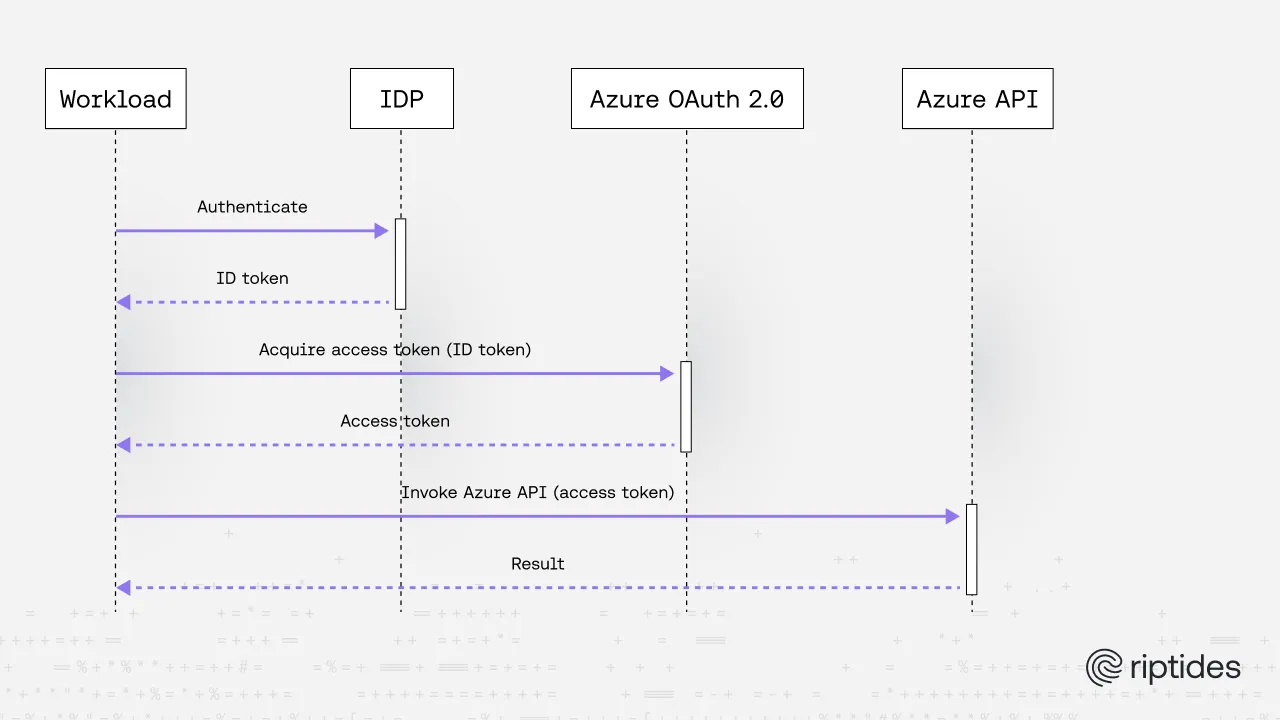
- Your application obtains an ID token from an external IdP.
- tokenex sends that token to Azure’s token endpoint.
- Azure validates:
- issuer
- subject
- audience
- federated credential configuration
- Azure issues an access token bound to the User-Assigned Managed Identity.
- Your application uses that token to call Azure APIs.
Architectural model
At a high level:
External IdP (OIDC) ↓ ID Token (JWT) ↓ tokenex ↓ Azure OAuth Token Endpoint ↓ Managed Identity Access Token ↓ Azure Resource API
Key separation of concerns:
- External IdP: asserts identity (authentication)
- Azure UAMI: defines authorization boundary (RBAC)
- tokenex: performs OAuth token exchange and refresh handling
- Azure Resource Manager / Graph / other APIs: enforce RBAC
Final Thoughts
Federated workload identity is becoming the standard method for authenticating non-human identities in the cloud. Azure’s support for federated credentials tied to User-Assigned Managed Identities enables secure, secretless authentication patterns.
By combining this with tokenex, you get:
- A clean abstraction for cloud credential exchange
- Automatic token refresh handling
- A unified interface across multiple cloud providers
- Reduced operational complexity
- Improved security posture
If you’re building multi-cloud or external-IDP-integrated systems, tokenex provides a practical, production-ready way to implement secure workload federation with Azure.
If you enjoyed this post, follow us on LinkedIn and X for more updates. If you'd like to see Riptides in action, get in touch with us for a demo.